Reaper network

Reaper Network Terminal

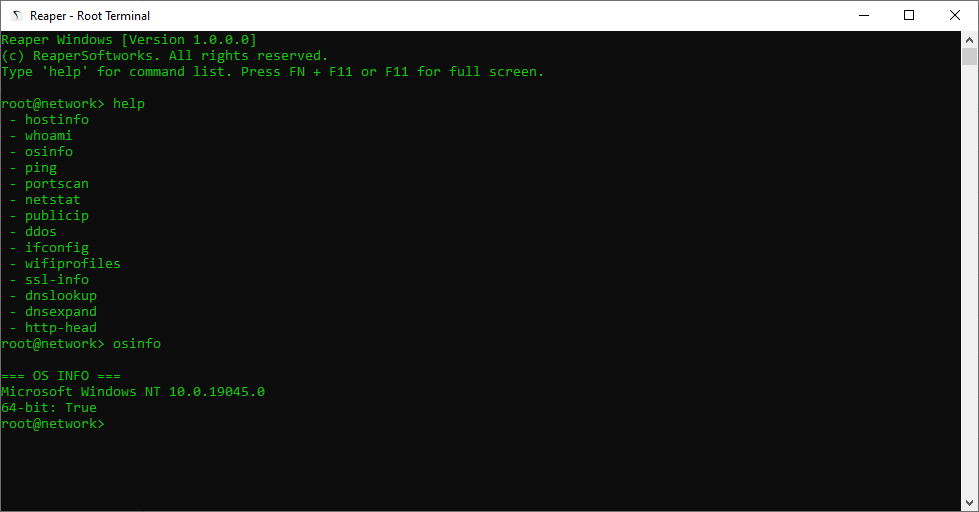
Reaper Terminal is a powerful console-based network tool. Perfect for Network testing & needing advanced system commands in one place.

Download Reaper Terminal

Available Commands

These entries are descriptions only. Implementation is intentionally omitted for actions that can be abused (flooding, sniffing, unauthorized access). Use these tools only on systems you own or have explicit permission to test.
ipscan
Discover live hosts on a subnet using ping/ARP discovery. Useful for inventory and troubleshooting.
winlocator
Find Windows hosts and common reachable Windows services on the network (discovery/identification only).
arpwatch
Monitor ARP table changes to detect new devices or ARP anomalies on the LAN. Good for spotting misconfigurations.
hostinfo
Shows hostname, DNS names, domain membership and basic network info for a host (informational).
whoami
Displays the currently logged-in user and effective privileges on the local system.
osinfo
Prints operating system, version, build number and CPU architecture — useful for compatibility checks.
netstat
Lists active network connections, listening ports, and routing info to help diagnose network state.
ping
Send ICMP echo requests to verify reachability and measure round-trip latency to a host.
portscan
Scan specified TCP/UDP ports on a target to find open services. Use responsibly and with permission.
sniffer
Capture packets on an interface for traffic analysis. Requires explicit authorization and adherence to privacy laws.
ipconfig
Show local interface configuration (IP addresses, gateways, DNS servers) on Windows systems.
publicip
Fetch the machine's public IP address as seen by internet services — useful for NAT and connectivity checks.
geolocate
Lookup approximate geographic location for an IP using public geolocation databases. Not precise; for context only.
dnslookup
Retrieve DNS records (A, AAAA, MX, TXT, etc.) for a domain to help debug name resolution and service setup.
dnsexpand
Resolve CNAME chains and expand domain records to show final endpoints and aliases (informational).
http-head
Send an HTTP HEAD to inspect server response headers and status without fetching the full body (quick fingerprint).
ssl-info
Retrieve SSL/TLS certificate metadata (issuer, validity dates, SANs) for a host to check expiry and chain issues.
wol
Send a Wake-on-LAN magic packet to wake a powered-off machine configured for WOL. Requires correct MAC and network path.
macvendor
Lookup vendor/manufacturer information for a MAC address to help identify device types on the LAN.
whoami-net
Show network-context user/host identity (effective user, hostname, domain membership) useful for auth debugging.
bandwidth
Run a benign throughput test between endpoints to estimate available bandwidth (diagnostic, not stress testing).
ddos
(Listed for completeness) Represents a stress/flood concept. No implementation provided. Launching floods without permission is illegal.
pingflood
(Listed for completeness) High-rate ICMP testing concept. Not implemented here and should not be used without explicit authorization.
wifiprofiles
List saved Wi‑Fi profiles on the local machine (SSIDs and metadata). Retrieving stored keys typically requires elevated rights.

Current Errors / Issues

Reaper
Network terminal has no errors.